
For bakeries with outlets and a central kitchen
Custom cake orders from outlet to kitchen to customer, without the WhatsApp group
Outlet staff enter each order once, with the reference photo and advance paid. The kitchen gets an alarm, the rider gets a call when it’s ready, and the customer gets WhatsApp updates. You see every outlet on one dashboard.
15-day free trial · From ₹599/month · Same-day setup · Support on WhatsApp and call, 24/7
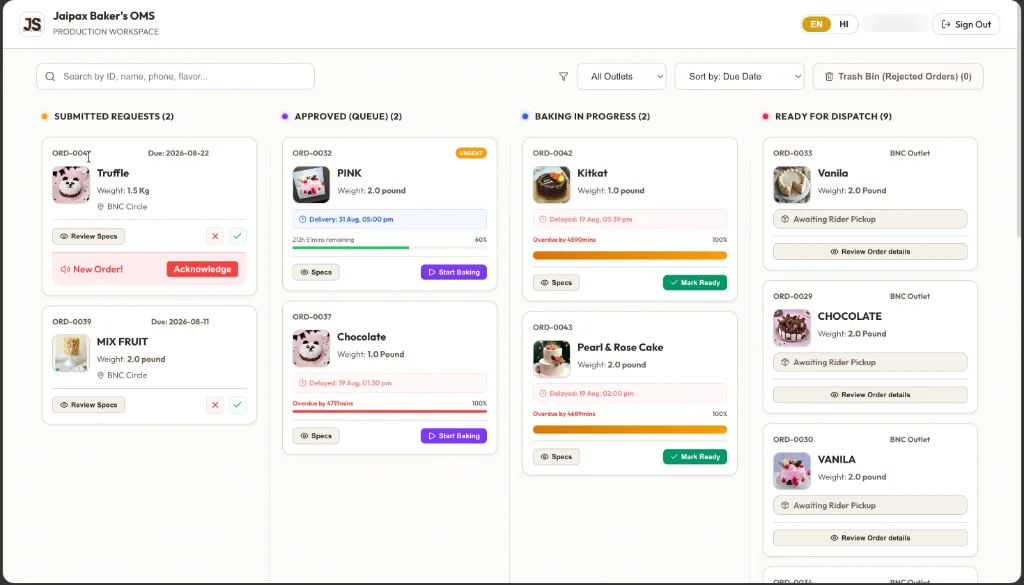
The kitchen board as used at Baker's Club, Barmer. Staff names blurred.
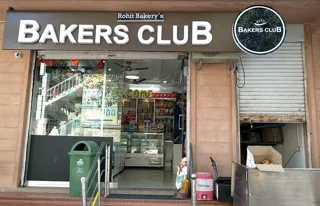
Baker's Club, Barmer runs its custom orders on Jaipax OMS every day: 300+ custom orders in the first two months.
The problem
A WhatsApp group works for one shop. It breaks at the second outlet.
Our founder visited eight bakeries in Jodhpur, door to door, to ask how they handle custom orders. Single-outlet bakeries were managing with WhatsApp. Owners with two or more outlets described the same four problems:
The reference photo is buried
The customer’s cake photo is somewhere in a chat with 200 other messages. The baker scrolls, guesses, and sometimes makes the wrong design.
Nobody confirmed the kitchen saw it
An order posted at 10 PM for tomorrow morning has no “seen and accepted” step. You find out it was missed when the customer arrives.
Which outlet, which rider, how much is pending?
With two or three outlets, nobody can say which outlet took the order, when it leaves the kitchen, or how much balance the customer still owes.
The owner becomes the system
Every question comes to the owner’s phone, because the owner is the only one who remembers everything.
How an order moves
One order, four people, no forwarding
Each person gets their own app and sees only what they need.
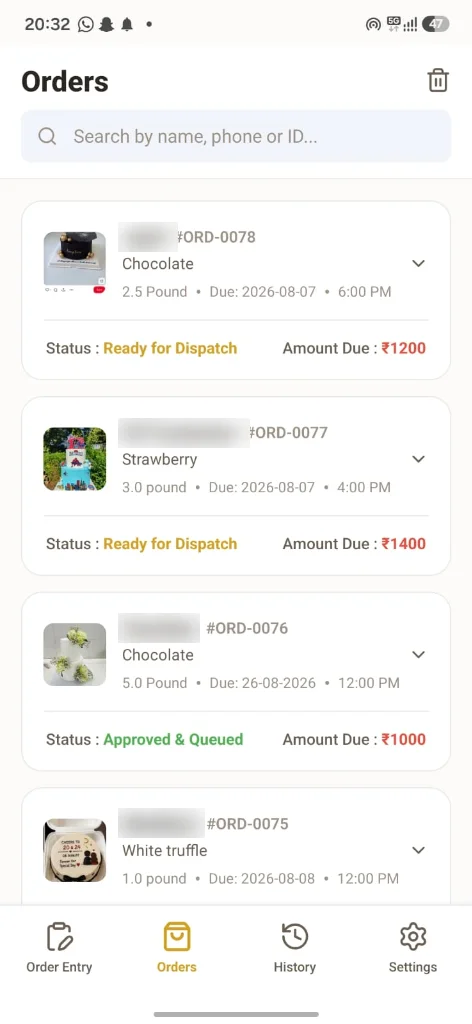
Step 1 · Outlet counter
Enter the order once, completely
Flavour, weight, date and time, message on the cake, reference photo, voice note, advance paid. Or paste the customer’s WhatsApp message and let Smart Paste fill the form.
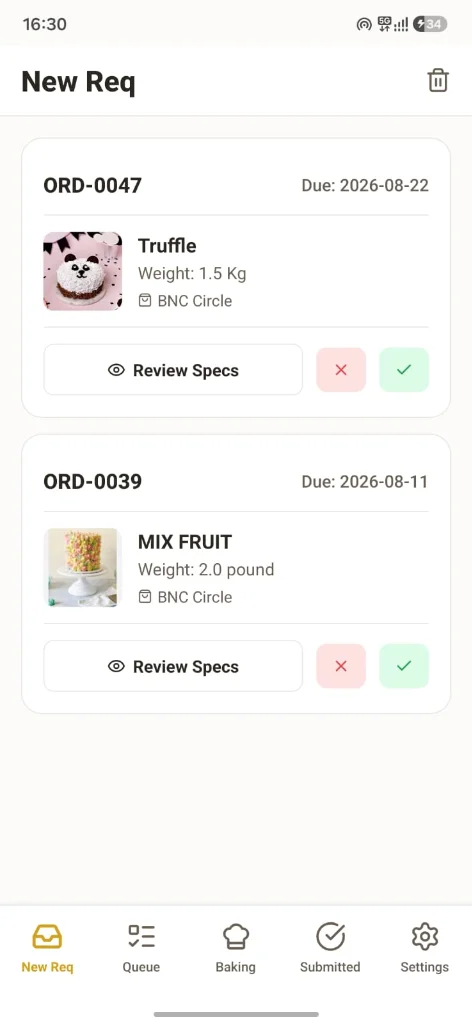
Step 2 · Kitchen
The kitchen alarm rings until someone acknowledges it
A new order sets off an alarm on the kitchen app that keeps ringing until a baker taps Acknowledge. The baker opens the specs, accepts or rejects, and moves it through Queue → Baking → Ready. Orders close to their due time are flagged.
Step 3 · Rider
The rider is called when the cake is ready
When the kitchen marks an order ready, the rider’s phone rings with the flavour, weight and which outlet it goes to. The rider marks it delivered at the store.
Rider’s phone
Delivery pickup available
Cake ready: Truffle (1.5 Kg) → your outlet
Step 4 · Customer
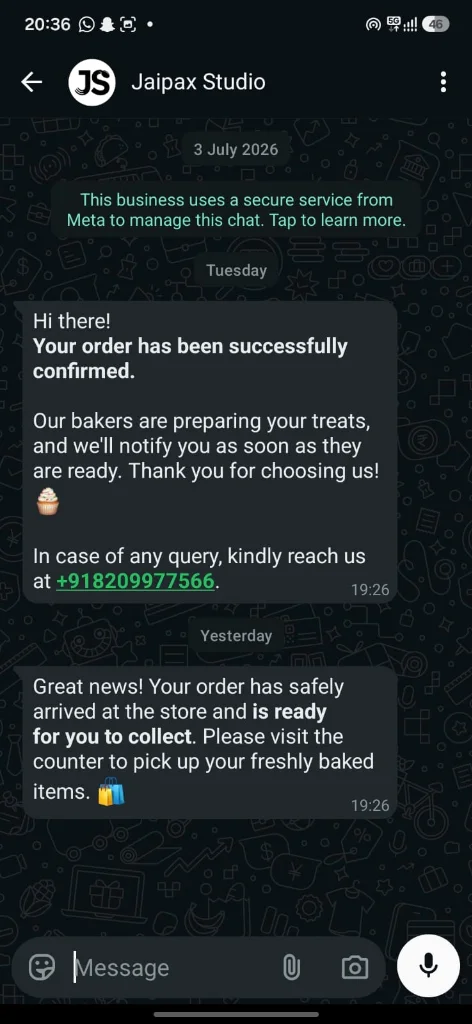
The customer gets WhatsApp updates automatically
When the kitchen accepts the order, the customer gets a confirmation on WhatsApp. When the cake reaches the outlet, they get a “ready to collect” message. (Pro Growth plan.)
Smart Paste
Customers still order on WhatsApp. Staff don’t retype it.
Copy the customer’s WhatsApp message, or record their voice note, and paste it into the outlet app. Smart Paste fills in the phone number, name, flavour, weight, delivery date and time, message on the cake and occasion.
It understands Hindi, Hinglish and English, including phrases like “kal shaam 5 baje”. Staff check the form and save.
Customer’s WhatsApp message
“Bhaiya 1 kg truffle cake chahiye kal shaam 5 baje, upar likhna Happy Birthday Riya”- Flavour
- Truffle
- Weight
- 1 Kg
- Delivery
- Tomorrow, 05:00 PM
- On cake
- Happy Birthday Riya
- Occasion
- Birthday · Riya
Example for illustration.
Pro Growth plan
Your own bakery website, built by us, plus WhatsApp that brings customers back
- A website for your bakery, included free. We design and set it up for you as part of the Pro Growth plan.
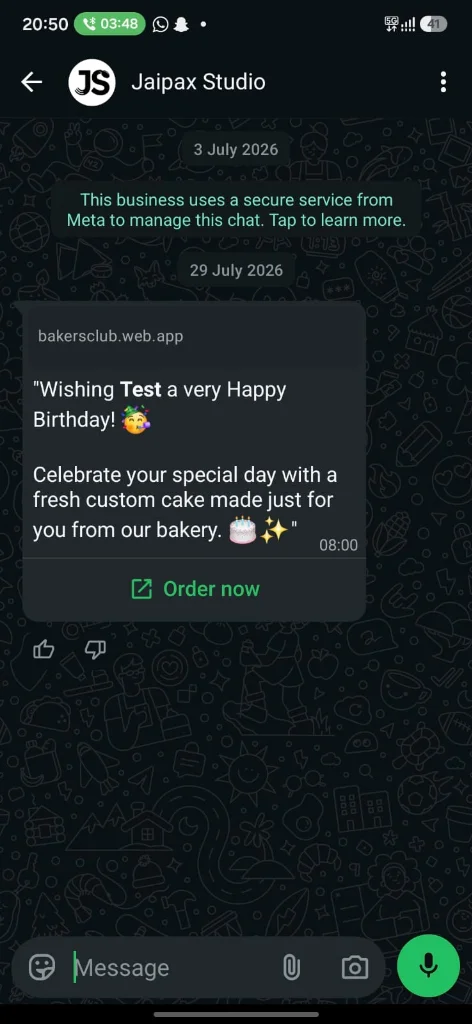
- Birthday and anniversary wishes. When an order is for a birthday or anniversary, the date is saved. Next year, on the day, the customer gets a WhatsApp wish with a link to order.
- Recovery campaigns. WhatsApp follow-ups from your website to bring back customers who didn’t finish ordering.
- Order updates. Confirmation and “ready to collect” messages go out automatically.
Jaipax Studio is a Meta Tech Provider: we connect your bakery’s own number to the official WhatsApp Business Platform. Meta bills message charges to you directly.

Who builds it
Built in Barmer for a real bakery first
“Baker's Club asked me for a way to move their outlets and kitchen off WhatsApp groups. I built it around how they actually work, and they use it every day. Now any bakery can use the same system, and you can reach me directly on WhatsApp.”
Ravi Jaipal, founder, Jaipax Studio · More about us
Pricing
Two plans. 15 days free.
Monthly subscription, cancel from inside the app.
Basic OMS
₹599/month
Outlet, kitchen and rider apps, owner dashboard, unlimited orders.
Pro Growth
₹1,499/month
Everything in Basic, plus WhatsApp updates, birthday wishes and a free bakery website.