
How it works
What each person in your bakery sees
Jaipax OMS gives the outlet counter, the kitchen, the riders and the owner their own screens. Staff log in with the role you give them, in English or Hindi, on the Android app or in a browser. The screenshots below are from Baker's Club’s live workspace, with names blurred.
Outlet staff
Order entry at the counter
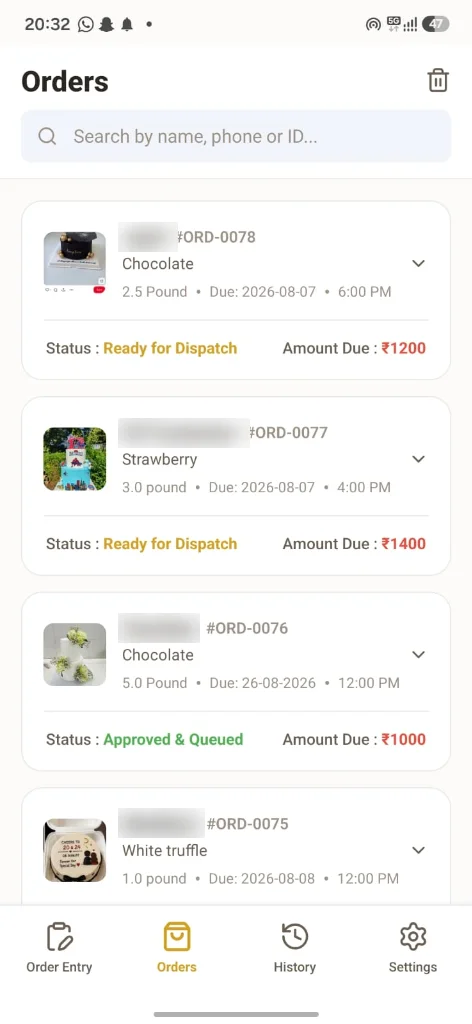
The outlet app is where an order starts. Each outlet sees only its own orders.
- Flavour, weight in Kg or pound, delivery date and time, message on the cake and where to write it
- Reference photos and voice notes attached to the order, so the kitchen sees exactly what the customer asked for
- Advance paid and balance due recorded on every order
- Occasion and whose occasion it is (for example, “Birthday · Riya”), used later for birthday and anniversary wishes
- Smart Paste: paste the customer’s WhatsApp message or voice note and the form fills itself, in Hindi, Hinglish or English
- Order list with status for every order: queued, baking, ready for dispatch, at the store
Kitchen / production
A kitchen board instead of a chat
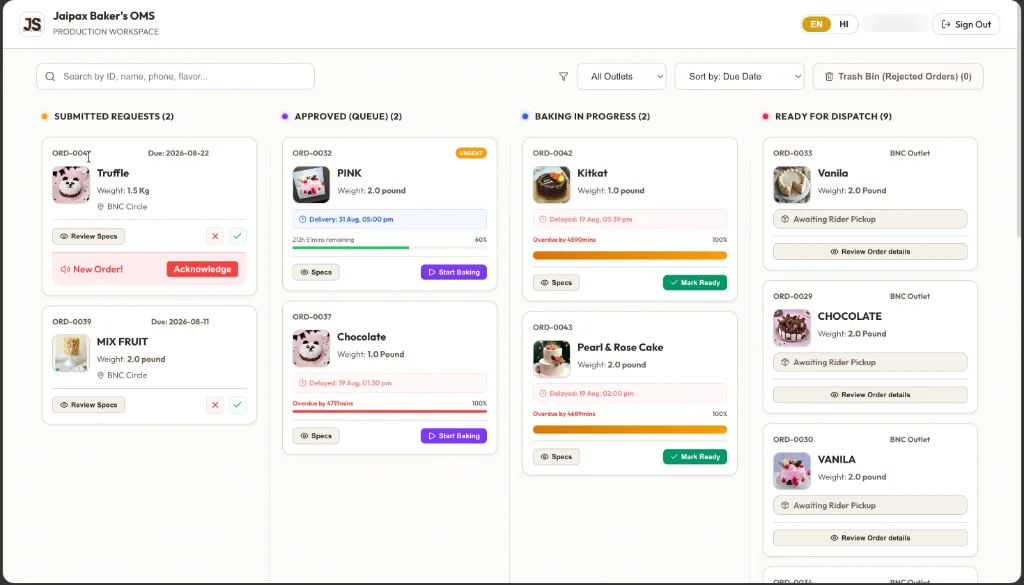
Every outlet’s orders arrive in one place, sorted by due time.
- New orders ring an alarm that keeps going until a baker taps Acknowledge
- Accept or reject each order after reviewing the specs, photo and voice note; rejected orders go to a trash bin, not lost
- Columns for Submitted, Queue, Baking and Ready for dispatch
- Urgent orders are marked, and orders past their time show how late they are
- An alarm when an order is getting close to its delivery time and isn’t ready yet
- Filter by outlet; works on a phone, tablet or kitchen screen
Rider
Rider alerts when a cake is ready
Riders don’t need to keep asking the kitchen.
- When the kitchen marks an order ready, the rider’s phone rings with the flavour, weight and destination outlet
- If a rider is assigned to the order, only that rider is alerted; otherwise all active riders are
- The rider marks the order delivered at the store, which triggers the customer’s “ready to collect” message
- Delivery history for each rider
Owner
The owner dashboard
For the person who used to be the system.
- Total booked revenue, average order value, advance collected and balance still due
- Revenue by outlet and week-by-week trend
- Average bake time, rider transit time and how late orders run
- Searchable history of every order, to settle “what did the customer ask for?”
- Customer list with order history, lifetime value and last order date
- Staff logins by role (outlet, kitchen, rider), created and reset by you
Your customer
WhatsApp messages from your bakery (Pro Growth)
Sent from your bakery’s own WhatsApp Business number through the official WhatsApp Business Platform.
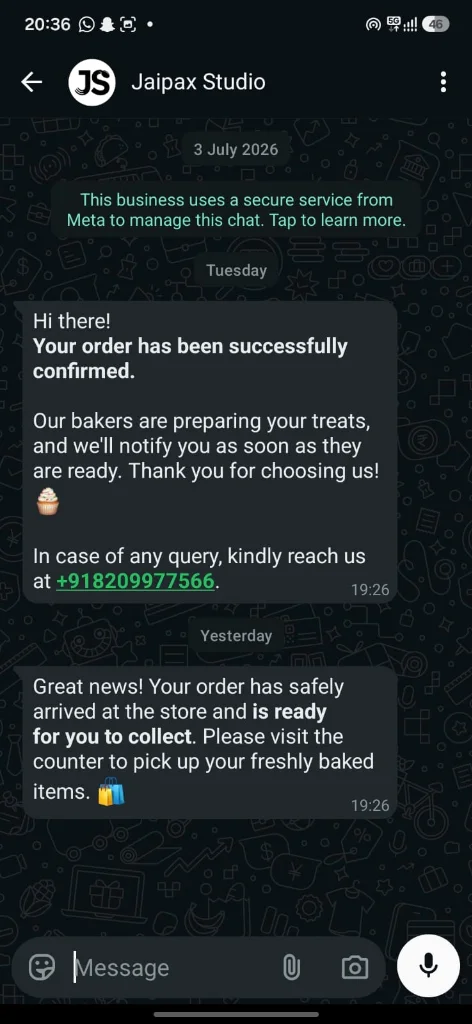
- Order confirmed, when the kitchen accepts the order
- Ready to collect, when the cake reaches the outlet
- Order rejected, if the kitchen can’t take it
- Birthday and anniversary wishes on the day, every year, with an order link
- You choose the message templates and turn each message on or off
What Jaipax OMS doesn’t do
So you know before you try it:
- • It is not a billing machine or POS for walk-in counter sales. Keep your billing system for that.
- • It does not track ingredient stock or recipes.
- • It is not connected to Swiggy or Zomato.
- • Reference photos and voice notes are deleted automatically after 90 days. The order details themselves stay.